On this page
- Why file size matters when you deliver from the road
- Where compression shows first in Queenstown light
- JPEGmini and JpegSlim side by side
- What JpegSlim looks like in use
- How much smaller to expect
- Other options you can use today
- A delivery routine that works from a motel room
- Which one to pick
- Questions people ask
- Sources
Holiday shoots around Queenstown end with a gallery to upload from a motel, a café or a phone hotspot. This is how JPEGmini and the newer JpegSlim compare when you need smaller files that still hold a big mountain sky.
Why file size matters when you deliver from the road
Travel and holiday work in Queenstown rarely ends at a desk. You shoot on a ridge above Lake Wakatipu in the morning, drive over the Crown Range in the afternoon and send the gallery that night on whatever connection the accommodation has. Editing is rarely the slow part. Uploading is.
The upload is where smaller files pay off first. They also open faster when a client scrolls the gallery on a phone at the airport. A compressor that keeps the pixel size and the look, and only removes data nobody can see, is the cheapest speed upgrade on the road.
| Gallery | Total size | Upload at a steady 10 Mbps |
|---|---|---|
| Full size exports, about 12 MB each | 3.6 GB | About 48 minutes |
| 65% smaller | 1.26 GB | About 17 minutes |
| 75% smaller | 0.9 GB | About 12 minutes |
A worked example, not a measurement. It assumes 12 MB per export and a steady 10 Mbps upload. Real connections vary and add overhead.
Where compression shows first in Queenstown light
The scenery here is the hard case for any JPEG compressor. Clear skies over The Remarkables, snow on the tops in winter and still water at dawn are smooth gradients with almost no texture to hide artefacts. That is where banding and blocky steps appear first.
An average score for the whole photo can be fooled by the busy parts of a frame. A tussock foreground full of detail scores well while the quarter of the frame that is pure sky quietly gets worse. That is why both apps here score each photo in tiles rather than as a whole.
JPEGmini, made by Beamr, scores each tile of the image with its Beamr Quality Measure, controls compression tile by tile and keeps the smallest candidate with no added visible artefacts, as its help centre explains. The measure and its pass mark are not published. JpegSlim tries many compression levels with the mozjpeg encoder and keeps the smallest file in which every 512 px tile still scores at least 88 on SSIMULACRA2, an open measure. On its published scale, 80 means no difference noticed side by side at 1:1, 85 none when the images are swapped in place, and 90 none even in a flicker test. JpegSlim also lets you flip between original and result in the app.
JPEGmini and JpegSlim side by side
| Feature | JPEGmini | JpegSlim |
|---|---|---|
| Platforms | Mac and Windows | Mac only, macOS 14 or later, Apple silicon and Intel |
| Unlimited photos | US$59 (Pro), 3 devices | US$39 planned, one time purchase |
| Lightroom | Plugin in the US$89 Pro + Plugins plan | Lightroom Classic export plugin, included |
| Capture One | Plugin in the US$89 plan | Open With in a Process Recipe, included |
| Quality check | Beamr Quality Measure per tile; measure and pass mark not published | Open SSIMULACRA2, every 512 px tile 88 or more |
| Several sizes in one run | Multi-size export to subfolders since version 4.5 (June 2026); watch folder automations in Pro + Automations (US$99) | Full size, 2048, 1600, 1200 px or custom, each in its own folder |
| Video and HEIC | Yes, in Pro | No, JPEG photos only |
| Status | On sale | Not on sale yet, waitlist open |
JPEGmini plans and features checked on jpegmini.com on 21 November 2026: Pro US$59, Pro + Plugins US$89, Pro + Automations US$99, Complete Bundle US$129. Every paid plan includes one year of updates. Version 4.5 features from the JPEGmini Mac release notes.
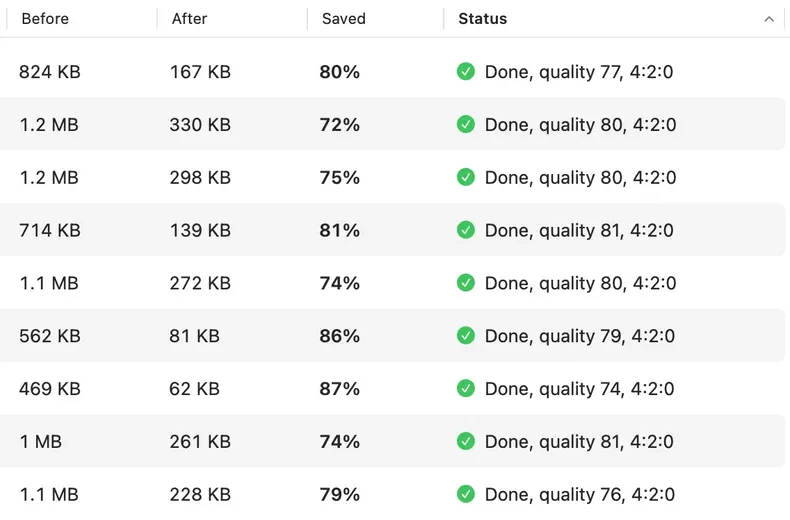
What JpegSlim looks like in use
How much smaller to expect
It depends on how the JPEG was saved. Exports at quality 100 have the most room. Camera JPEGs and files already saved at quality 90 have little left to give, whichever app you use.
| Source files | Median saving |
|---|---|
| Exports saved at quality 100 | About 70% |
| Exports saved at quality 98 | About 48% |
| Camera JPEGs at Fine (about quality 95) | About 23% |
| Files already saved at quality 90 | About 10% |
| Smaller preset for web, from quality 100 | About 85% |
Early numbers on a synthetic test set of scans and generated frames, not real camera exports. Real files with high ISO noise usually shrink somewhat less. A side by side test of both apps on the same real Lightroom and Capture One exports will follow on Nomado Apps.
For JPEGmini, its home page claims up to 80%, while its pricing page mentions up to 70%. The two independent tests above landed at about 65% and 75%.
Other options you can use today
If you need smaller files this week, these work now. None of them sets a per tile quality floor for you, so check a few sky frames yourself.
- ImageOptim: a free, open source Mac app. It is lossless by default, which saves little on photos; turn on its lossy option for bigger savings at a quality you choose.
- Squoosh: free and runs in the browser, one image at a time with a split view preview you can drag across the image. Handy for a blog image on a borrowed laptop, slow for a whole gallery.
- Optimage: a US$15 Mac app with a free version limited to 24 images a day. Its site mentions perceptual metrics but does not name them or publish a threshold.
- Caesium Image Compressor: free, with source code on GitHub, for Mac and Windows. You choose the compression settings.
- Your editor's own export: in Lightroom Classic, lower the JPEG quality slider or use Limit File Size To in the Export dialog; in Capture One, set the quality in the process recipe.
More options, with prices and how each one sets quality, are compared in the full JPEGmini and JpegSlim comparison.
A delivery routine that works from a motel room
Export once at full size, quality 100
Let Lightroom or Capture One handle colour and sharpening. Quality 100 gives the compressor the most room and leaves you a clean master.
Make every size in one pass
In JpegSlim, tick full size for the client gallery and 2048 px for social and blog use. Each size lands in its own folder.
Check the flattest frames
Open two or three frames with clear sky or misty water in the compare view at 100% and flip between original and slimmed.
Upload before dinner
Start the gallery upload while you eat. If the connection drops, a smaller file is quicker to send again.
Keep the masters until the client has the gallery
Hold the full size exports on two drives until the client confirms everything opens.
Which one to pick
Choose JPEGmini if
You need it today, or on Windows
- You edit on Windows or on both platforms
- You want video and HEIC in the same app
- You use the Photoshop plugin
- You need it this week
Choose JpegSlim if
You work on a Mac in Lightroom Classic or Capture One
- You want a quality floor on every part of the sky
- You want an open, published quality measure you can look up
- You want to flip between original and result inside the app
- You prefer one lower price with the plugin included
- You are happy to wait for launch
Visiting Queenstown yourself and would rather be in the photos? Queenstown Memories photographs couples, families and travellers in and around Queenstown.
See our photo sessionsQuestions people ask
Is JpegSlim available to buy?
Not yet. JpegSlim is in private testing and goes on sale once Apple has approved the developer account and the app is signed and notarised. The planned price is US$39, one time. The JpegSlim page has a waitlist that sends one email on launch day.
Will clients notice the compression in a gallery?
JpegSlim keeps the smallest file in which every 512 px tile still scores at least 88 on SSIMULACRA2. On that scale, 85 means an average viewer notices no difference when the images are swapped in place at 1:1. JPEGmini scores each tile with Beamr's own quality measure, which is not published.
With either app, check a few flat sky frames at 100% before you deliver.
Does JpegSlim run on Windows?
No. JpegSlim is a Mac app and needs macOS 14 Sonoma or later on Apple silicon or Intel. JPEGmini runs on both Mac and Windows.
Is a compressed file still fine for printing?
Both apps keep the pixel dimensions, so a slimmed full size file still prints at full size. For large prints of smooth skies, many photographers keep the quality 100 export as the print master and deliver slimmed copies for viewing and sharing.
Does compression strip EXIF or copyright data?
JpegSlim keeps EXIF, IPTC, XMP and the colour profile by default. You can choose to keep only the colour profile and orientation if you prefer smaller files for the web.
Sources
- JPEGmini pricing (jpegmini.com)
- JPEGmini for Mac downloads and release notes (jpegmini.com)
- JPEGmini review, 631 Nikon Z7 II files (The Phoblographer, 2023)
- JPEGmini brings its file size shrinking tech to Capture One (PetaPixel, 2019, citing DPReview)
- SSIMULACRA2 and its score scale (Cloudinary on GitHub)
- How JPEGmini optimization works (tiles and the Beamr Quality Measure) (JPEGmini help centre)
- JPEGmini home page, up to 80% claim (jpegmini.com)
- ImageOptim for Mac (imageoptim.com)
- Squoosh (Google Chrome Labs)
- Optimage (optimage.app)
- Caesium Image Compressor (SaeraSoft)
Prices and features checked on 21 November 2026. Prices can change; the maker's site has the final word.