On this page
A tired evening in a Queenstown motel, two cards on the desk, and the wrong one goes back in the camera and gets formatted. In most cases the photos are still on it. What you do in the next hour decides how many come back.
Why the photos are usually still there
When a camera formats a card it normally writes a fresh, empty file table and leaves the photo data where it was. To the camera the card looks empty, but the pictures are still on it until new files are written over them.
Two things change that. Every new frame you shoot lands on space the old photos were using. And some cameras offer a full or low level format that overwrites the whole card. After that kind of format, no software can bring the files back, so check which option you used.
The first hour: what to do and what to avoid
Do this
- Take the card out of the camera. If it has a lock switch, slide it to lock.
- Put it in its own pocket or case with a note, so it cannot go back in the camera by accident.
- Switch to a spare card for the rest of the trip.
- Write down what was on it: the dates, roughly how many photos, raw or JPEG, and any video.
Avoid this
- Shooting even one more frame on the card.
- Clicking Initialise, Repair or Format when your laptop offers.
- Running Disk Utility First Aid or any repair tool on it. Repairs write to the card.
- Copying a file onto it to test whether it still works.
Recovering while you are still travelling
If the card is physically fine, you do not need to rush to a lab. Recovery software on your laptop can do the job in an evening, with no internet connection needed. Three rules matter more than which tool you use: open the card read only, save what comes back to a different drive, and if the card throws errors, copy the whole card to an image first and scan the copy.
| Scan | What it does | When to use it |
|---|---|---|
| Quick scan | Reads the file system and finds current and deleted files with their original names, in seconds | Files deleted by mistake, a card that still has its file system |
| Deep scan | Also searches every part of the card for photos and video | After a format, or when the card is damaged |
| Copy to a disk image first | Reads the card once into an image on your Mac, then scans the image. The copy can resume if it stops. | A failing card with read errors |
Tools you can use today
CardRescue is not on sale yet, so if the card cannot wait, use a tool that exists now. PhotoRec from CGSecurity is free and open source, runs on macOS, Windows and Linux in a plain text interface, and reads the card without writing to it. Disk Drill from CleverFiles is a commercial recovery app; check what its free version allows before you rely on it. Whichever you choose, keep the same rules: read only, save to another drive, and image a failing card first.
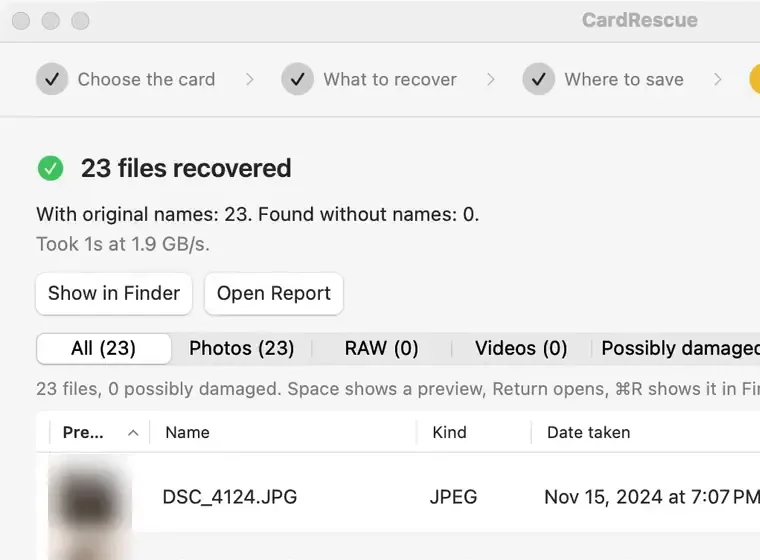
What CardRescue looks like
Software or a recovery lab
| Option | Cost | What happens |
|---|---|---|
| Recovery lab | From about US$100 to US$200, often US$1,000 or more | The card is shipped away and you wait days or weeks. The right call for cracked, bent or water damaged cards. |
| CardRescue on your Mac | US$49 planned, one time | Scan on your own Mac with the card never written to. Planned free scan before you pay. |
| Reshoot | Often impossible | Holiday light, a family together, a proposal: most of it happens once. |
Lab prices from the published price lists of Central Computer (from about US$100) and Rossmann Group (flash and SD cards from US$200), checked November 2026.
What can come back
- Photos: JPEG, HEIF and HEIC, TIFF
- Camera raw: CR2, CR3, NEF, ARW, DNG, ORF, RW2 and PEF
- Video: MOV and MP4
- Cards formatted as FAT12, FAT16, FAT32 or exFAT, including cards with a damaged partition table or boot sector
- Original file names where the card still has them, including after a quick format in our tests
Honest limits: CardRescue's engine is tested on card images built and damaged on purpose, not on every real card. Deleted files stored in pieces may come back damaged, and are marked "possibly damaged" so you know which to check first. No recovery tool can promise every file.
A card routine for travel shoots
- Carry more cards than you need, so no card has to be reused before it is backed up.
- Back up every evening to the laptop and a small SSD before you sleep.
- Format a card only when two copies of its files exist, and only in the camera you shoot with.
- Keep used cards in a separate case, turned face down, so used and empty never mix.
- Label cards by number and note which day each one covered.
Visiting Queenstown yourself and would rather be in the photos? Queenstown Memories photographs couples, families and travellers in and around Queenstown.
See our photo sessionsQuestions people ask
Can photos be recovered after formatting an SD card in the camera?
Usually, yes, after a normal quick format, as long as nothing new has been written to the card. A full or low level format that overwrites the card cannot be undone by software.
I took more photos after formatting. Is it too late?
Not necessarily. New photos overwrite some of the old data, but a deep scan can still find what was not overwritten. Stop shooting on the card now; every extra frame reduces what comes back.
My laptop says the card is unreadable. What now?
Cancel any offer to initialise or format it. CardRescue lists cards that macOS cannot open, and for a card with read errors you can copy it to a disk image first and scan the copy.
Does CardRescue work on Windows?
No. CardRescue is a Mac app and needs macOS 14 or later on Apple silicon or Intel, with a card reader.
Is CardRescue available yet?
Not yet. It goes on sale once Apple has approved the developer account and the app is signed and notarised. The planned price is US$49, one time, and the plan is to let you scan free and see every recoverable file before you pay.
Sources
- PhotoRec (CGSecurity)
- Disk Drill (CleverFiles)
- CardRescue page (Nomado Apps)
- Rossmann Group, SD card data recovery (price list)
- Central Computer, data rescue (price list)
Lab prices checked in November 2026.